Like Python and most other modern languages, C#
has exceptions. Code may throw an exception to indicate that
an exceptional situation has occurred, typically some sort of error.
In an addition, the C# language itself will throw an exception in
some situations, such as if code attempts to access an array element
that's out of bounds, or attempts to access a property of null.
When an exception is thrown, it will pass up the call stack, aborting the execution of any methods in progress until some block of code catches the exception and continues execution. If the exception is not caught, the program will print an error message and terminate.
An exception in C# is an object, specifically any
object belonging to the System.Exception
class or any of its subclasses. A large number of exception classes
are built into the standard library including
IndexOutOfRangeException, NullReferenceException,
FormatException, and others.
The throw statement throws an
exception, either of a built-in or user-defined exception class.
(This is like raise in Python.) For example:
class OpException : Exception {
    char op;

    public OpException(char op) {
        this.op = op;
    }
}

int compute(char op, int a, int b) =>
    op switch {
        '+' => a + b,
        '-' => a - b,
        '*' => a * b,
        _ => throw new OpException(op)
};The try statement attempts to execute
a block of code. It may have one or more catch clauses,
each of which will execute if a certain type of exception is thrown.
For example:
static void Main() {
    StreamReader reader;
    try {
        reader = new StreamReader("numbers");
    } catch (FileNotFoundException e) {
        WriteLine("can't find input file: " + e.FileName);
        return;
    } catch (DirectoryNotFoundException) {
        WriteLine("invalid path");
        return;
    }
    …
When an exception is caught, the catch block (called an exception handler) executes. As you can see in the code above, a catch block may optionally specify a variable to receive the exception object.
A catch block may rethrow the
exception it caught, or even a different exception. If a catch
block does not throw an exception, execution resumes below the try
statement.
C# also allows us to write generic methods (or generic functions) that take one or more type parameters, so they can work with values of various types.
For example, consider a function that rotates an array of integers to the left. The first element will move to the end of the array, and all other elements will shift leftward by one position:
void rotate(int[] a) {
    int x = a[0];
    for (int i = 0 ; i < a.Length ; ++i)
        a[i] = a[i + 1];
    a[^1] = x;
}
We may call the function like this:
int[] a = [10, 20, 30, 40, 50];
rotate(a);
Console.WriteLine(a[0]);  // writes 20
Let's generalize the function so that it will work with values of any type:
void rotate<T>(T[] a) {
    T x = a[0];
    for (int i = 0 ; i < a.Length ; ++i)
        a[i] = a[i + 1];
    a[^1] = x;
}
In the code above, T is a type parameter. The name T is arbitrary; in its place we could write U, or any other name we like. However it's traditional in C# (and some other languages too) to use the name T for a single type parameter.
A class
in C# may also be generic. In fact we've already been using List<T>
from the standard library, which is a generic class. Let's now see
how we may write our own generic classes.
Like a
generic method, a generic
class has one or more type parameters. Here is a generic class
FixedStack<T> representing
a fixed-size stack of objects of type T:
classFixedStack<T> {T[] a;intnum;// number of elements currently on the stackpublicFixedStack(intmaxSize) {a =newT[maxSize];}publicvoidpush(T val) {a[num] = val;num +=1;}publicT pop() {num -=1;T ret = a[num];returnret;}}
In the class above, T is a type parameter. When
the caller creates a FixedStack,
they will specify the type T:
FixedStack<int> s = new(100);  // create a stack of ints
s.push(15);
s.push(25);

FixedStack<string> t = new(100);  // create a stack of strings
t.push("hello");
t.push("goodbye");
Notice that inside the class
FixedStack<T> the type
T can be used like any other type: we can create an array of objects
of type T, or use T as a method parameter type, a method return type
or a variable type.
Observe
that a FixedStack is
not quite like a stack
in a dynamically typed language such as Python, where a single stack
can hold objects of
various types. In C#, by contrast, each FixedStack
is tied to some particular
element type. That is a good thing: if we create a FixedStack<int>,
intending to hold ints, and then attempt to push a string to it by
mistake, we will get a compile-time error.
An
interface may also be generic. For example, here's a generic
interface IStack<T>, which is a stack of elements
of type T:
interface IStack<T> {
    void push(T i);
    T pop();
}
Above, we wrote a class FixedStack<T>. Let's
modify that class so that it implements the IStack<T>
interface:
classFixedStack<T> : IStack<T> {T[] a;intnum;// number of elements currently on the stack…}
As we've seen before, a variable may have an interface type:
IStack<double> s = new FixedStack<double>(100);
s.push(2.0);
s.push(4.0);
Let's add an interface ICollection<T>
for representing collections of any types. Our hierarchy will now
look like this:
interface ICollection<T> {
    bool is_empty { get; }
    bool contains(T x);
}

interface IStack<T> : ICollection<T> {
    void push(T x);
    T pop();
}

class FixedStack<T> : IStack<T> {
    T[] a;
    int num;
    ...
FixedStack<T> will now need to implement the
is_empty property and the contains()
method. Writing is_empty is easy:
public bool is_empty => num == 0;
We might attempt to implement contains() like this:
    public bool contains(T x) {
        for (int i = 0; i < n; ++i)
            if (a[i] == x)  // ERROR: will not compile
                return true;
        return false;
    }
The code above will not compile, since you cannot use the ==
operator to compare two values with a generic type. Instead, use
the Equals() method:
    public bool contains(T x) {
        for (int i = 0; i < n; ++i)
            if (a[i].Equals(x))
                return true;
        return false;
    }
In my opinion it's a bit awkward that C# has both an == operator and
an Equals() method which don't always behave exactly the
same way, but that's just how it is.
Let's look a bit more at Equals(),
which is defined in the top-level Object class:
virtual bool Equals (object obj); // return true if this object equals (obj)
By default, the Equals() method, just like the ==
operator, tests reference equality, i.e. tests whether two
objects are actually the same object. For example:
class Point {
    double x, y;

    public Point(double x, double y) {
        this.x = x;
        this.y = y;
    }
}

Point p = new(3.0, 4.0);
Point q = new(3.0, 4.0);


WriteLine(p.Equals(q));   // writes False
WriteLine(p == q);        // writes False
Sometimes we may want to override this method. Arguably two Point
objects should be equal if they contain the same x- and
y-coordinates. Let's override the Equals method to
implement that notion of equality:
    // in class Point
    public override bool Equals(object? o) =>
        o is Point p && x == p.x && y == p.y;
The Equals() method takes a parameter of type object?,
so we need to use the is operator to test whether it is
a Point and is not null.
With that override, let's try comparing again:
Point p = new(3.0, 4.0);
Point q = new(3.0, 4.0);

WriteLine(p.Equals(q));   // writes True
WriteLine(p == q);        // writes False
Point objects with the same x- and y-coordinates are now
equal according to the Equals() method. However, the ==
operator is still checking for reference equality, so it produces
false when given two different objects. If we want, we
can also provide an overloaded operator == that would return true in
this situation:
// in class Pointpublicstaticbooloperator==(Pointp,Pointq)=>p.x==q.x&&p.y==q.y;
You'll notice that if we override Equals(), the C#
compiler prints a warning saying that we should also override
GetHashCode():
'Point' overrides Object.Equals(object o) but does not override Object.GetHashCode()
That's because two objects that are considered equal by the Equals()
method must always have the same hash code, otherwise a HashSet
and other collections will not work properly. In the Point
class, we might implement GetHashCode by retrieving a
hash code for the pair (x, y):
    // in class Point
public override int GetHashCode() => (x, y).GetHashCode();In the examples we saw above, a generic method or class took a type parameter T that could be any type at all. Sometimes we will want to require that the type T has certain capabilities, for example by requiring that it implements a certain interface. We can accomplish that via a generic constraint.
For example, consider a function that computes the sum of all integers in an array:
int sum(int[] a) {
    int s = 0;

    foreach (int i in a)
        s += i;
    return s;
}
We could write a similar function that computes the sum of an array
of doubles, but it would be nicer to have a single function that we
can use for int, double, or any other
numeric type. We can't write the function using an unconstrained
generic:
T sum<T>(T[] a) {
    T s = 0;            // ERROR: Cannot implicitly convert type 'int' to 'T'

    foreach (T i in a)
        s += i;         // ERROR: Operator '+=' cannot be applied to operands of type 'T'
    return s;
}
The type T must have a zero element and must support addition. In the
library there's a generic interface INumber<T>
for numeric types that support these and other numeric operations.
The standard types int, float, and double
implement INumber<T>. So we may add a constraint
saying that T must implement that interface:
using System.Numerics;

T sum<T>(T[] a) where T : INumber<T> {
    T s = T.Zero;

    foreach (T i in a)
        s += i;
    return s;
}
Now the code will work fine. Note that we must write T.Zero
to retrieve the zero element of type T. (Actually Zero
is defined in INumberBase<T>, a parent interface
of INumber<T>.)
Suppose
that we want to write a class TreeSet<T>
that holds values of type T
in a binary tree. As a first
attempt, we might write
class Node<T> {
    public T val;
    public Node<T>? left, right;

    public Node(T val) { this.val = val; }
}

class TreeSet<T> {
    Node<T>? root;

    public bool contains(T x) {
        Node<T>? p = root;
        while (p != null) {
            if (x == p.val)      // ERROR: Operator '==' cannot be applied to operands of type 'T'
                return true;
            else if (x < p.val)  // ERROR: Operator '<' cannot be applied to operands of type 'T'
                p = p.left;
            else
                p = p.right;
        }

        return false;
    }

    // more methods here: insert(), delete(), ...
}
This code will not compile. The problem is that we can't use the > operator to compare two values of type T, because T might be some type that is not ordered – for example, T might be an array type, and arrays cannot be compared in C#.
The C# standard library contains a generic
interface IComparable<T>
that is implemented by all ordered built-in types. IComparable<T>
means "comparable with objects of type T". For example, the
built-in type int implements IComparable<int>,
since integers are comparable with integers. IComparable<T>
is defined like this:
interface IComparable<T> {
    int CompareTo (T other);
}
The CompareTo() method returns
a negative number
if this object is less than other
0 if this object equals other
a positive number
if this object is greater
than other
For example:
WriteLine(4.CompareTo(7)); // writes -1, since 4 < 7
Let's add a constraint to TreeSet<T>
that says that T must implement IComparable<T>.
The code will now look like this:
class Node<T> {
    public T val;
    public Node<T>? left, right;

    public Node(T val) { this.val = val; }
}

class TreeSet<T> where T: IComparable<T> {
    Node<T>? root;

    public bool contains(T x) {
        Node<T>? p = root;
        while (p != null) {
            int c = x.CompareTo(p.val);
            if (c == 0)
                return true;
            else if (c < 0)
                p = p.left;
            else
                p = p.right;
        }

        return false;
    }

    // more methods here: insert(), delete(), ...
}
Notice that even if T is
constrained to implement IComparable<T>,
we still cannot use the < or == operators to
compare two elements of type T – instead, we must call CompareTo().
This is inconvenient, and is
arguably a weakness in C#. Above, we saw that an interface can
provide operators: any class implementing the INumeric<T>
interface must include + and
other numeric operators. This is a relatively new feature (it first
appeared in C# 11, released in 2022). Unfortunately IComparable<T>
does not include operators
such as < and == (probably for reasons of backward compatibility).
In the TreeSet<T> example in
the previous section, it was a bit inconvenient that we had to make
the Node class generic and write Node<T>
everywhere we wanted to use it. As an alternative, we can make Node
be a nested class inside TreeSet<T>. Then
it won't need to be declared as a generic class Node<T>,
but will still be able to use the type variable T declared by its
containing class TreeSet<T>. The code will look
like this:
class TreeSet<T> where T: IComparable<T> {
    class Node {
        public T val;
        public Node? left, right;

        public Node(T val) { this.val = val; }
    }

    Node? root;

    public bool contains(T x) {
        Node? p = root;
        while (p != null) {
            int c = x.CompareTo(p.val);
            if (c == 0)
                return true;
            else if (c < 0)
                p = p.left;
            else
                p = p.right;
        }

        return false;
    }

    // more methods here: insert(), delete(), ...
}
In my opinion this is nicer. Node is just a helper class
for TreeSet<T> anyway, so it makes sense for it to
be nested.
As another example, suppose that we want to write
a Dictionary class that maps keys to values using a hash
table. It might look
like this:
class Dictionary<K, V> where K : IComparable<K> {
    …

    public void add(K key, V val) { … }

    public bool contains(K key) { … }
}
Here, K and V are two type parameters. When the caller creates a
Dictionary, they will specify types for K and V:
Dictionary<int, string> d = new();   // maps int → string
d.add(10, "sky");
d.add(20, "purple");

Dictionary<string, double> e = new();  // maps string → double
e.add("purple", 55.2);
As we learned in Introduction to Algorithms, a hash table contains an
array of hash chains,
each containing a
linked list of nodes. So we will need a Node class that
holds a key of type K and a value of type V. We could declare it as a
generic class Node<K, V>, but it will be easier to
nest it inside the class Dictionary<K, V>, and
then it will be able to use the types K and V directly. Our code
might look like this:
class Dictionary<K, V> where K : IComparable<K> {
    class Node {
        public K key;
        public V val;
        public Node? next;

        public Node(K key, V val) {
            this.key = key; this.val = val;
        }
    }

    Node?[] a;  // array of hash chains

    ...
}
In fact the standard library contains a class Dictionary<K,
V> that works similarly.
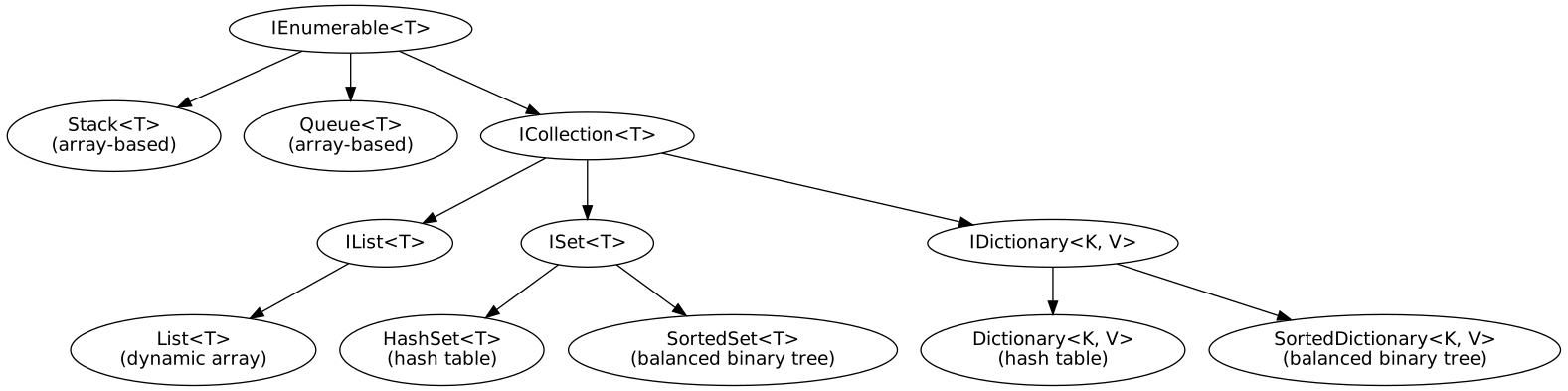
LIke many object-oriented languages, C# contains a set of collection classes in its standard library. These classes implement common data structures such as stacks, queues and hash tables.
Here is a picture of the class hierarchy of some of the major collection classes and interfaces:
All of
these classes and interfaces live in the namespace
System.Collections.Generic.
In the picture, an arrow from A to B means that B implements or inherits from A.
All
entities above whose names begin with the letter I (e..g ICollection,
IDictionary)
are interfaces.
This is a standard naming convention in the C# standard library.
The
classes and interfaces above are generic,
so you can
instantiate them with any type. For example, List<T>
is a generic type with type
parameter T:
List<int> l = new();
l.Add(4);
List<string> m = new();
m.Add("hi");The picture above includes the following classes:
List<T> is
a dynamic array, similar to a list in Python. (Actually we first
discussed this class a few weeks ago.) List<T>
contains an Add() method
for appending an element to the end of a List.
It also contains an indexer so that you can get or set elements by
index.
Stack<T> implements
a stack using a dynamic array. It includes methods Push()
and Pop().
Queue<T> implements
a queue using a dynamic array, and includes methods Enqueue()
and Dequeue().
The classes HashSet<T> and
SortedSet<T> implement sets, with methods Add(),
Contains() and Remove(). They differ in
their underlying data structure: HashSet<> uses a
hash table and SortedSet<T> uses a balanced
binary tree.
Finally, the classes Dictionary<K,
V> and SortedDictionary<K, V> implement
dictionaries, with an indexer that can get/set values as well as a
ContainsKey method. They differ in their underlying
data structure: Dictionary<K, V> uses a hash
table and SortedDictionary<K, V> uses a balanced
binary tree.
You can read more details about these classes and
interfaces in our Quick
Library Reference. Note that you will need to follow
the class hierarchy in order to find all the members available
in each of these classes. For example, the methods available in
List<T> include
not only the ones listed under List<T> in
the library reference, but also those listed under IList<T>
and ICollection<T>, since List<T>
implements those interfaces.
You can read even more details about the collection classes (including various classes not depicted above) in the official .NET API documentation.
Notice that all collection classes ultimately
inherit from an interface IEnumerable<T>. This
interface contains various methods that allow the foreach
statement to iterate over a collection's values. We will not discuss
these methods at this point, but you should know that you can use
foreach to iterate over any collection.
You will want to become fluent in using these collection classes. With them, you finally have easy access to useful data structures that we often used in Python, i.e. lists, sets and dictionaries.
Dictionaries in particular are quite useful, so
let's look at the
Dictionary<K, V> class a bit more. As you can see
in the documentation, Dictionary<K, V> implements
the interface IDictionary<K, V>, which in turn
implements the interface ICollection<KeyValuePair<K, V>>.
This means that a dictionary is a collection of key-value pairs.
You can use foreach to iterate over a dictionary, and
each element you get back will be a KeyValuePair<K, V>.
Each KeyValuePair in turn has properties Key
and Value. For example:
    Dictionary<string, int> d = new Dictionary<string, int>();
    d["yellow"] = 10;
    d["red"] = 15;
    d["blue"] = 20;

    foreach (KeyValuePair<string, int> p in d)
WriteLine($"key = {p.Key}, value = {p.Value}");A delegate is a value that represents a function or method. It's similar to to a function object in Python, or a function pointer in languages such as C.
The delegate keyword declares a new
delegate type. For example:
delegate bool IntCondition(int i);
With this declaration, an IntCondition is a type of
delegate that takes an integer argument and returns a boolean.
We can now declare a variable of type
IntCondition, and use it to refer
to a function or method of corresponding type:
bool isOdd(int i) => i % 2 == 1;

IntCondition c = isOdd;
…
We can invoke the delegate using function call syntax:
WriteLine(c(4)); // writes False
In the example above, the delegate c refers to a static method odd().
A delegate may also refer to an instance method, in which case it
actually references a particular object on which the method will be
invoked. For example:
class Interval {
    public int low, high;
    public Interval(int low, int high) { this.low = low; this.high = high; }

    public bool contains(int i) {
        return low <= i && i <= high;
    }
}

IntCondition c = new Interval(1, 5).contains;
IntCondition d = new Interval(3, 7).contains;
WriteLine(c(2));  // writes True
WriteLine(d(2));  // writes False
Here is a function that counts how many elements in an array of integers satisfy an arbitrary condition:
int count(int[] a, IntCondition c) {
    int n = 0;
    foreach (int i in a)
        if (c(i))
            ++n;
    return n;
}
We can invoke this function as follows:
bool isEven(int i) => i % 2 == 0;

int[] a = { 3, 4, 5, 6, 7 };
WriteLine(count(a, isEven));  // writes 2
Delegates may be generic:
delegate bool Condition<T>(T t); // maps type T to bool
Here is the count() function from above, rewritten to
work on an array of any type T. Notice that the
function itself must also be generic (indicated by the "<T>"
after the method name).
int count<T>(T[] a, Condition<T> c) {
    int n = 0;
    foreach (T x in a)
        if (c(x))
            ++n;
    return n;
}
The standard library contains several useful generic delegate types.
The built-in type Predicate<T>
is exactly equivalent to the type Condition<T>
that we just defined:
delegate bool Predicate<T>(T obj);
Additionally, the built-in type Func<T,
U> represents an arbitrary function from type T to type
U:
delegate U Func<T, U>(T arg);
A lambda expression is an anonymous function that can appear inside another expression. (It's similar to an lambda expression in Python, which we saw last semester).
For example, here's a generic function map()
that applies a Func<T, U> to every element of an
array of type T[], returning a new array of type U[]:
U[] map<T, U>(T[] a, Func<T, U> f) {
    U[] b = new U[a.Length];
    for (int i = 0; i < a.Length ; ++i)
        b[i] = f(a[i]);
    return b;
}
We can define a function and pass it to map():
int plus2(int i) => i + 2;

int[] a = { 100, 200, 300 };
int[] b = map(a, plus2);
Alternatively, we can invoke map() using a lambda
expression:
int[] b = map(a, i => i + 2);
Here, i => i + 2 is a lambda expression. It's an
anonymous function that takes an integer parameter i and returns the
value i + 2.
A lambda expression may refer to parameters or
local variables in its containing function or method. For example,
suppose we want to write a method that adds a given value k to each
element in an array. We could write a local
method and pass it to map():
int[] add_k(int[] a, int k) {
    int f(int i) {
        return i + k;
    }

    return map(a, f);
}
Or we can use a lambda expression that adds k directly:
int[] add_k(int[] a, int k) {
    return map(a, i => i + k);
}